
How To Make Passive Income With Simple Mobile Apps (part 1)
 86
86  1
1  12
12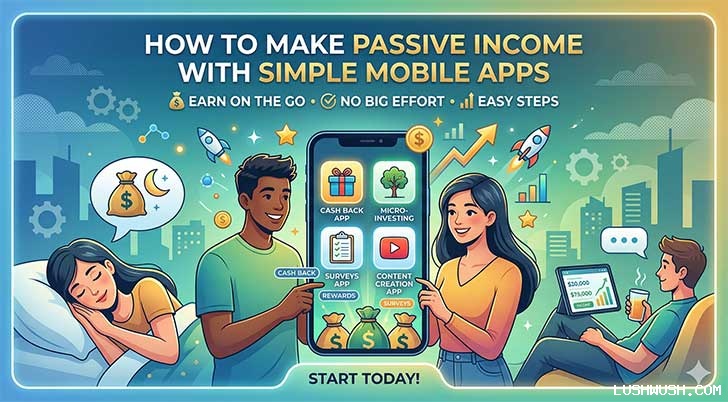
How to Make Passive Income with Simple Mobile Apps: A Beginner's Guide (Part 1)
Most conversations about passive income start the same way: stocks, real estate, gold, dividend investing. All solid strategies. All worth pursuing.
But there's a category of passive income that most people in finance circles don't talk about nearly enough one that has almost zero startup cost, no physical inventory, no tenants, and no broker fees. It works 24 hours a day, 7 days a week, and scales with virtually no additional effort on your part.
That category is digital products. And right now, one of the most accessible and underrated digital products a solo creator can build is a simple mobile app.
Before you click away thinking "I'm not a programmer" stay with me. Because what most people imagine when they hear "app" is nowhere close to what's actually generating consistent monthly revenue for thousands of solo developers right now.
The App Economy Is Bigger Than Most People Realize
Let's start with the scale of the opportunity, because the numbers are worth understanding.
According to data from Statista and app analytics platforms, global consumer spending on mobile apps exceeded $170 billion in 2023. The Google Play Store alone hosts over 3 million apps, and users downloaded more than 100 billion apps globally in a single year.
Here's the part that surprises most people: the overwhelming majority of revenue in the app economy doesn't come from massive games or social platforms built by teams of 50 engineers. A significant portion comes from small, focused utility apps built by solo developers or tiny teams apps that do one specific thing well and have a loyal, returning user base.
The question isn't whether the opportunity exists. It clearly does. The question is how to approach it intelligently.
Why Simple Apps Beat Complex Ones for Solo Developers
If you're an individual or a very small team, trying to compete with companies building feature-rich social apps, games with high-end graphics, or AI-powered platforms is a losing strategy. The development cost alone would be prohibitive, and you'd be competing directly with organizations that have millions in funding.
But that's the wrong game to play.
The right game for solo developers is what's called the micro-utility model: building a small app that solves one specific, everyday problem for a clearly defined group of people.
What Makes a Good Micro-Utility App?
The best micro-utility apps share a few common characteristics:
They solve a real friction point. Not a hypothetical problem, but something people actually experience regularly. Forgetting what to pack for a trip. Struggling to calculate a tip at a restaurant. Needing a quick unit converter. Wanting a simple habit tracker without a subscription fee. These problems are unglamorous and that's exactly why they represent opportunity.
They don't require complex infrastructure. No massive servers, no real-time databases, no machine learning pipelines. They run locally on the user's phone and do their job without needing an internet connection or ongoing backend maintenance.
They have repeat usage. An app someone opens once and never returns to has minimal advertising value. An app someone opens three times a week before every trip, every gym session, every shift at work accumulates real session time and real ad impressions that translate into real revenue.
Real Examples of Simple Apps That Generate Consistent Income
- Packing list apps used by frequent travelers before every flight
- Water intake trackers opened multiple times daily
- Prayer time calculators used five times a day by hundreds of millions of Muslims globally
- Tip calculators opened at restaurants worldwide
- BMI and calorie calculators used by people tracking health goals
- Loan and EMI calculators opened by anyone comparing financial products
None of these apps required a team of engineers. None of them have complex AI or real-time data feeds. They're clean, functional, and useful and because they're useful, people open them regularly.
How Free Apps Generate Real Revenue
This is the question that surprises most beginners: if the app is free to download, where does the money actually come from?
The answer for most simple utility apps is mobile advertising specifically through a platform called Google AdMob, which is essentially Google AdSense applied to mobile applications.
How AdMob Works
Once your app is live and approved for AdMob, you integrate a small piece of code that allows Google to display ads to your users. These ads appear in several formats:
Banner ads sit at the bottom or top of the screen while the user interacts with the app. They're non-intrusive and run continuously during the session.
Interstitial ads are full-screen ads that appear at natural transition points in the app between screens, after completing an action, or when a user navigates back. They command higher attention and therefore higher revenue per impression.
Rewarded ads give users something of value (an unlock, a feature, virtual currency) in exchange for voluntarily watching a short video ad. These have the highest engagement rates and the highest revenue per view.
What Does AdMob Actually Pay?
The honest answer is: it varies significantly by geography, app category, and time of year. But here are realistic benchmarks to give you a framework:
- CPM (cost per thousand impressions): typically $0.50$5 for banner ads, $2$15 for interstitials, higher for rewarded formats
- An app with 5,000 daily active users viewing banner ads might generate $5$25 per day or $150$750 per month
- An app with 20,000 daily active users using interstitial ads could generate $1,000$5,000+ per month
- Seasonal peaks: Ad revenue typically spikes in Q4 (OctoberDecember) when advertisers spend more aggressively for the holiday season
These numbers aren't lottery-style windfalls. But they're also genuinely passive once the app is built and live. The app earns while you sleep, work, or build your next project.
Beyond Ads: Other Monetization Options
Advertising isn't the only way to monetize. As your app grows, other revenue streams become viable:
Freemium model: The core app is free, but a one-time payment or subscription unlocks premium features no ads, additional functionality, customization options. Many utility apps successfully charge $1.99$4.99 for a premium unlock.
In-app purchases: For apps where it makes sense, users can buy specific add-ons, themes, or expanded content.
One-time paid app: Less common today but still viable for specific professional tools where users understand and expect to pay upfront.
For beginners, starting with ads-only is the lowest friction path. Once you understand your user behavior and what they value, you can layer in premium features.
How to Find an App Idea That Will Actually Work
The biggest mistake new app developers make is starting with technology and working backward to find a use case. The right approach is the opposite: start with a real human problem and build the simplest possible solution for it.
The Problem-First Framework
Ask yourself these questions:
What do people search for on their phone that takes too many steps? If the current options are clunky, slow, or cluttered with features most users don't need, there's room for a cleaner solution.
What do you do repeatedly that you wish an app handled better? Your own frustrations are some of the most reliable sources of genuine product ideas.
What niche communities have specific recurring needs? Travelers, students, healthcare workers, small business owners, religious communities, fitness enthusiasts each has specific recurring tasks they do on their phones that could be simplified.
Validating Your Idea Before Building
Before investing any time in development, spend an hour doing basic research:
Search the Google Play Store for apps solving the same problem. If there are apps with tens of thousands of reviews, that's a signal the market exists not a reason to avoid it. You don't need to be the only option; you need to be a genuinely better option.
Read the 1-star and 2-star reviews of existing apps in your target category. These are literally your potential users telling you exactly what's wrong with the current solutions. That feedback is your product roadmap.
Check Google Trends to see whether interest in your app's core topic is stable or growing. A rising trend is a tailwind.
Building Your App: More Accessible Than You Think
A decade ago, building a mobile app required knowing Java or Swift programming languages with steep learning curves. That's no longer the barrier it once was.
No-Code and Low-Code Platforms
Platforms like MIT App Inventor, Thunkable, FlutterFlow, and Adalo allow you to build functional Android and iOS apps using visual interfaces dragging and dropping components rather than writing code. For simple utility apps (calculators, list makers, trackers, converters), these platforms are genuinely capable.
MIT App Inventor is particularly beginner-friendly and completely free. It was originally developed at Google and is now maintained by MIT. Many successful utility apps on the Play Store were built entirely with App Inventor.
If You Want to Learn Basic Coding
For those willing to invest a few weeks in learning, Flutter (Google's cross-platform framework) is widely considered the best starting point for building apps that work on both Android and iOS from a single codebase. There are hundreds of hours of free tutorials on YouTube, and the Flutter community is large and helpful.
The decision between no-code and low-code vs. learning to code comes down to your timeline and long-term goals. If you want to build and launch your first app within a month, start with App Inventor. If you want to build a portfolio of apps over the next year, learning Flutter will pay dividends.
Launching on Google Play: Do This Before You Hit Publish
You've built your app. You're excited. Every instinct tells you to submit it to the Play Store immediately and watch the downloads roll in.
Don't do that yet.
The Google Play Console
The Google Play Console is Google's developer dashboard where you manage every aspect of your app's presence on the Play Store uploading the app file, writing the store listing, setting pricing, managing reviews, and analyzing performance data.
Setting up a developer account costs a one-time fee of $25. That's it. One payment gives you lifetime access to publish unlimited apps.
The Console is where you'll spend a significant amount of time, so it's worth familiarizing yourself with its layout before launch day arrives.
The Most Common Launch Mistake
The single biggest mistake beginner developers make is submitting their app for public release before it's been properly tested across different devices and Android versions.
Android runs on thousands of different phone models from budget devices with limited RAM to high-end flagships with the latest processors. An app that works perfectly on your personal phone might crash on a different device with a different screen size or an older version of Android.
If users encounter crashes and bugs on day one, they leave 1-star reviews. Those reviews hurt your app's ranking in Play Store search results. And a ranking hit in the first few days of launch when Google's algorithm is most actively evaluating your app can set your app back significantly.
The solution is something every professional developer uses before going public.
Closed Testing: Your Safety Net Before Going Live
The Closed Testing feature in the Google Play Console allows you to release your app to a small, controlled group of testers before it goes live to the general public.
Here's how it works in practice:
You upload your app to Closed Testing and invite a group of testers friends, family members, colleagues, or volunteers from online communities like Reddit's r/androidapps. They receive a private link to download and install your app directly from the Play Store.
Over the next one to two weeks, they use the app normally and report anything that breaks, looks wrong, or feels confusing. You receive crash reports automatically in your Play Console, showing you exactly where the app is failing and on which devices.
You fix the issues, push an update, and your testers verify the fixes. Once the app is running cleanly across a variety of devices and you've received positive feedback on the user experience, you're ready to move to public release.
Why This Step Changes Everything
Closed testing doesn't just protect you from bad reviews. It also:
- Gives you real user feedback on whether your app is intuitive and actually useful
- Helps you identify features that are confusing or missing
- Builds a small initial user base that may leave your first genuine positive reviews when you launch publicly
- Gives you confidence that what you're releasing is a professional, polished product
The difference between an app with a 4.5-star rating and a 2.8-star rating is often not the idea it's whether the developer took testing seriously before launch.
The Passive Income Mindset: Why Apps Are Digital Rental Properties
There's a mental model that helps clarify why building apps is one of the best passive income strategies available right now.
Think of a simple utility app like a small rental property. Building it is the upfront investment time, effort, and a small amount of money. Publishing it is putting the property on the market. Every user who downloads and regularly uses your app is, in effect, a tenant paying rent in the form of ad impressions.
The difference from actual real estate? Your app has zero maintenance calls at 2am. No property taxes. No physical deterioration. The "tenant" (your user) generates revenue passively as long as they keep using the app, which they'll do as long as the app stays useful.
A well-built utility app from five years ago can still generate consistent revenue today if it solves a problem that hasn't changed and the developer keeps it updated and compatible with new Android versions.
What's Coming in Part 2
Building and launching your app is only the beginning. Once it's live, the next challenge is discoverability making sure that when someone searches the Play Store for the problem your app solves, your app is one of the first results they see.
That's the world of App Store Optimization (ASO): the strategies around app titles, descriptions, keywords, screenshots, icons, and review management that determine where your app ranks in search results.
In Part 2, we'll cover exactly how ASO works, what Google's algorithm actually looks for, and the specific steps you can take to rank higher, get more organic downloads, and build a self-sustaining growth engine for your app without spending a dollar on paid advertising.
Have you ever had an app idea that you thought "someone should really build this"? Drop it in the comments you might be looking at your next passive income project.















All comments, feedback, information or materials except email addresses submitted to Lush Wush shall be considered non-confidential and its property. By submitting such comments, feedback, information or materials to us, you agree to a no-charge assignment of all worldwide rights. For the best interest of the community, please refrain from posting vulgar comments, profanity, or personal attacks. Comments submitted may automatically be flagged for review by our moderation team before appearing on the website.