
How To Apply For Google Adsense (and Exactly When To Do It)
 9
9  1
1  1
1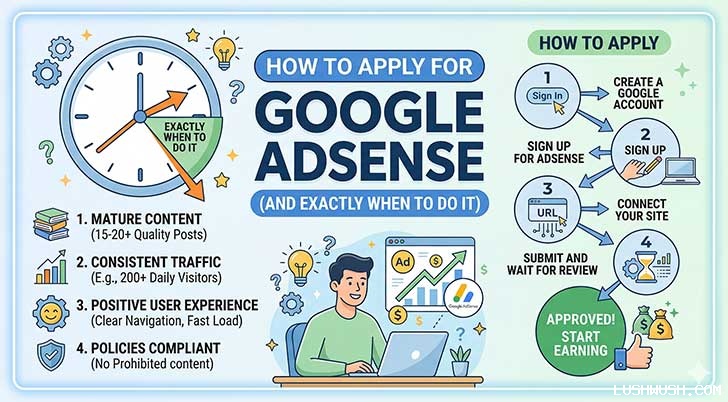

If you have been working hard on your blog or website, writing great content, and designing a beautiful layout, you are probably wondering when you will actually start making money. For most creators, the answer is Google AdSense.
AdSense is one of the most reliable and popular ways to generate passive income from your website. But here is the catch: Google does not just approve anyone. If you apply too early or your website is missing key elements, your application will be rejected.
Today, we are going to walk through exactly when your website is ready, and the step-by-step process of how to apply.
Part 1: WHEN Should You Apply? (The Checklist)
The biggest mistake beginners make is applying the moment they finish building their website. Google needs to see that your site is an established, trustworthy source of information. Before you even think about applying, make sure you pass this checklist:
1. High-Quality, Original Content
You should have at least 15 to 20 well-written, original articles published. Copying and pasting content from other sites will result in an instant rejection.
2. Indexed by Google
Having 20 articles on your site means nothing if Google doesn't know they exist. You need to submit your sitemap to Google Search Console and ensure your pages are actively "Indexed" in Google Search results.
3. The Mandatory Legal Pages
Google requires total transparency. Your website must have a clear navigation menu that includes these three essential pages:
Privacy Policy
Contact Us
About Us
4. Website Age
While there is no strict rule, it is generally highly recommended to let your website age for at least 4 to 8 weeks before applying. A brand-new, two-day-old website looks suspicious to reviewers.
Want to know your exact score? Stop guessing and check your status with our free custom tool! Visit the LW AdSense Readiness Calculator to instantly see if your website meets the criteria for approval.
Part 2: HOW to Apply for Google AdSense
Once your Readiness Score is in the green, it is time to officially apply! The process is incredibly simple:
Step 1: Create Your Account
Go to the official Google AdSense website and sign in with your primary Google account. You will be asked to enter your website URL (e.g. http://www.yourwebsite.com) and your payment country.
Step 2: Connect Your Site
Once your account is set up, navigate to the "Sites" tab on the left-hand menu and click "Add Site."
Step 3: Paste the Code
Google will generate a unique piece of HTML code for you. You need to copy this code and paste it into the section of your website. If you are using WordPress, you can easily do this using a free plugin like WPCode or Insert Headers and Footers.
Step 4: Request Review
After pasting the code, go back to your AdSense dashboard and click the button to confirm you have added it. Now, you wait!
The Waiting Game
The review process usually takes anywhere from a few days to two weeks. During this time, the most important thing you can do is keep publishing new content. Show the Google reviewers that your website is active and growing.
Once approved, you can start placing ads on your pages and watch your passive income grow!


















All comments, feedback, information or materials except email addresses submitted to Lush Wush shall be considered non-confidential and its property. By submitting such comments, feedback, information or materials to us, you agree to a no-charge assignment of all worldwide rights. For the best interest of the community, please refrain from posting vulgar comments, profanity, or personal attacks. Comments submitted may automatically be flagged for review by our moderation team before appearing on the website.