
How To Apply For Google Adsense (and Exactly When To Do It)
 216
216  0
0  23
23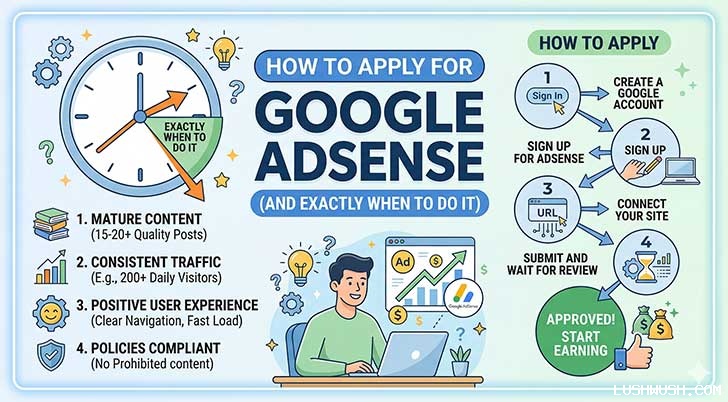

How to Apply for Google AdSense (And Exactly When to Do It)
The Blogger Who Applied on Day 4
Meet Dana. In March, she launched a personal finance blog, and by day four she'd published six articles a couple barely 400 words bolted on a plugin-generated privacy policy nobody had actually read, and hit "Apply for AdSense" the same afternoon she registered her domain.
Forty-eight hours later, the rejection email landed. Dana was crushed. She'd done the fun part writing and designing and assumed approval was basically a formality once your site existed. She didn't apply again for two months, quietly convinced her blog "just wasn't good enough."
Here's what actually happened: her site wasn't rejected because it was bad. It was rejected because it wasn't ready yet, and nobody had told her the difference between those two things. When Dana came back eight weeks later with 19 well-researched articles, a real About page, and a sitemap fully indexed in Google Search Console, she was approved on her first real attempt and within four months was earning roughly $260 a month from a blog pulling about 11,000 monthly pageviews.
The gap between those two outcomes wasn't luck. It was a checklist. Today we're walking through exactly what's on it, and the step-by-step process of applying once you're genuinely ready.
Why AdSense Approval Isn't Automatic
It helps to understand this from Google's side of the table for a second. Advertisers are paying real money often $0.20 to well over $3.00 per click depending on the industry to have their ads shown next to content Google is willing to vouch for. If AdSense approved every site instantly, thin, spammy, or copied content would flood the network, advertisers would get poor results, and the whole system would collapse.
So the review isn't Google being difficult for the sake of it. It's quality control protecting a marketplace that both publishers and advertisers depend on. Once you see it that way, the checklist stops feeling like arbitrary hoops and starts feeling like exactly what it is: proof that your site is a real, trustworthy destination worth putting ads on.
Part 1: When Should You Apply? The Readiness Checklist
The single biggest mistake beginners make is applying the moment the website "exists" instead of the moment it's actually ready. Before you touch the apply button, run through this checklist honestly.
Content Volume and Quality Requirements
Google has never published an official minimum article count, but based on what consistently gets sites approved, the practical target is:
- 15 to 20 published articles, ideally more if your niche is competitive
- 800 to 1,200+ words per article for most niches anything routinely under 400-500 words risks being flagged as thin content
- 100% original writing. Copy-pasted, lightly spun, or unedited AI-generated text is one of the fastest routes to rejection
- Genuine expertise signals an author bio, real examples, first-hand insight, and sources where relevant, which all feed into what Google calls E-E-A-T (Experience, Expertise, Authoritativeness, Trustworthiness)
Indexing, Sitemaps, and Legal Pages
Having 20 great articles means nothing if Google doesn't officially know they exist yet. Before applying:
- Submit your sitemap through Google Search Console
- Check the Coverage/Pages report and confirm your key articles show as "Indexed," not "Crawled currently not indexed" or "Excluded"
- Make sure robots.txt isn't accidentally blocking Googlebot from your content
- Confirm your site runs on HTTPS, not HTTP
Google also requires full transparency through three pages linked clearly in your navigation menu, not buried in a footer nobody clicks:
- Privacy Policy should genuinely disclose your use of cookies and Google's ad personalization, not just be a generic template
- About Us establishes who's behind the site and why they're qualified to write about the topic
- Contact Us a real email address or working contact form
One more detail people forget: AdSense requires applicants to be 18 or older. If you're younger, a parent or guardian can apply using their own Google account instead.
Want a faster way to check where you actually stand instead of guessing article-by-article? Our free AdSense Readiness Calculator scores your site against this exact checklist in under a minute.
How Long Should You Wait? Website Age and Trust Signals
Google has never published an official minimum domain age either technically, a two-week-old site with outstanding content can get approved, and a six-month-old site with weak content can still get rejected. Age isn't the real requirement. It's a proxy for something else: whether you've had enough time to publish real volume, get it indexed, and let a few trust signals accumulate.
That said, most experienced publishers recommend letting a new site run for 4 to 8 weeks before applying, simply because that's roughly how long it realistically takes to hit 15-20 quality articles, get them indexed, and iron out technical issues not because Google is watching a calendar.
Part 2: How to Apply for AdSense Step by Step
Once your readiness score is in the green, the actual application is refreshingly simple.
Setting Up Your Account and Connecting Your Site
- Go to the official AdSense website and sign in with your primary Google account
- Enter your website URL (e.g., yourwebsite.com) and select your payment country carefully this cannot be changed later, even if you move
- Once your account is created, open the Sites tab in the left-hand menu and click Add Site
Placing the Code and Requesting Review
- Google generates a unique HTML snippet. Copy it and paste it into the <head> section of your site. On WordPress, a free plugin like Insert Headers and Footers or WPCode makes this a copy-paste job with no coding required
- Return to your AdSense dashboard and confirm you've added the code
- Create your ads.txt file at your site's root domain this is one of the most commonly missed steps, and Google will flag it in your dashboard if it's missing or incorrect. Most WordPress AdSense plugins can generate this automatically
- Click Request Review
Now you wait.
What Happens After You Apply: The Review Timeline
Review typically takes anywhere from a few days to two or three weeks, though it can occasionally stretch to four to six weeks, especially for newer sites or during high-volume periods. Some publishers also notice their account move through what feels like two stages an initial "site ready" status, followed sometime later by full ad-serving approval. Don't panic if that happens to you; it's a normal part of the process for a lot of accounts, not a sign something went wrong.
While you wait:
- Keep publishing. New, quality content signals an active, growing site rather than one built solely to chase ad revenue
- Don't make major design overhauls mid-review let reviewers see a stable, finished site
- Resist refreshing the dashboard obsessively. It won't speed anything up, and it's genuinely just stressful
Common Mistakes That Get Applications Rejected (What NOT to Do)
- Applying with fewer than roughly 15 published articles
- Publishing thin posts under 400-500 words, especially in bulk
- Using copy-pasted, spun, or unedited AI-generated content
- Leaving a generic "Lorem ipsum" or template-default Privacy Policy live
- Skipping or hiding the About Us / Contact Us pages from your main navigation
- Applying before your sitemap is submitted and pages show as indexed
- Letting robots.txt accidentally block Googlebot from key pages
- Buying traffic, using bots, or encouraging click activity on your own ads
- Applying under 18 without using a parent or guardian's account
- Reapplying the very same day after a rejection without actually fixing the stated issue this can draw out scrutiny on future reviews rather than speeding anything up
Real Numbers: What Timing Actually Costs You
Let's put two hypothetical but realistic blogs side by side, same niche, same launch month, same effort level otherwise.
Blog A Applied on Day 4 (Dana's original approach)
- Rejected within 48 hours, didn't reapply for 10 weeks
- Spent those 10 weeks discouraged instead of writing
- Reapplied at week 10, approved week 11, restarting with only 9 articles
- By month 6: roughly 9,000 monthly pageviews
Blog B Applied at Week 8 (Dana's second attempt, done right)
- Spent weeks 1-8 focused entirely on writing: 19 solid articles, indexed, legal pages live
- Applied once, approved within about a week
- By month 6, with two extra months of consistent publishing behind it: roughly 14,000 monthly pageviews
At a modest blended RPM (revenue per 1,000 pageviews) of $12, common for a general lifestyle or personal finance niche:
- Blog A: 9,000 pageviews 1,000 $12 $108/month
- Blog B: 14,000 pageviews 1,000 $12 $168/month
That's a $60/month gap roughly $720 a year that traces directly back to one rushed application and the ten weeks of lost writing momentum that followed it. RPM varies significantly by niche and country, so treat these as illustrative figures rather than a guarantee, but the underlying lesson holds regardless of the exact numbers: a single premature application can cost you months of compounding, not just a rejection email.
Your AdSense Application Action Plan
- Audit your content. Count total published articles and flag anything under 600-800 words for expansion before you apply
- Check indexing in Search Console for every article you're counting toward your 15-20
- Confirm all three legal pages exist and are linked in your main navigation, not buried in a footer
- Verify HTTPS is active and your robots.txt isn't blocking crawlers
- Run a quick originality check on any older or guest-contributed posts
- Submit your application once, then immediately set up your ads.txt file
- Keep publishing 2-3 new articles per week while your review is pending
- If rejected, read the specific reason Google gives you, fix only that issue thoroughly, and give it real time before reapplying rather than resubmitting the same day
Google's specific policies and review process can shift over time, so it's worth double-checking the current official guidelines on AdSense's own site before you apply, especially if it's been a while since you last read them.
Beginner FAQ: Google AdSense Approval
How many pageviews do I need before applying? There's no official minimum traffic requirement. Genuine, organic visitors help demonstrate your site provides real value, but you won't be rejected purely for a low visitor count if your content and pages are solid.
Can I apply using a free subdomain like Blogger or WordPress.com? Blogger is an official AdSense host partner, so hosted accounts are possible there. For most other free subdomains, a custom domain (yoursite.com) is strongly recommended it signals permanence and noticeably improves approval odds.
My application was rejected. How soon can I reapply? Google doesn't publish a fixed universal cooldown. The safer approach is to wait until you've meaningfully fixed the exact issue named in your rejection email often several weeks of real work rather than resubmitting the same content the next day.
How much can a beginner realistically earn in the first year? It varies enormously by niche, traffic, and geography, but a new blog reaching 5,000-15,000 monthly pageviews might realistically see somewhere in the $50-$300/month range early on, with earnings compounding as both traffic and content library grow. Finance, insurance, and B2B software niches tend to sit at the higher end of the RPM range because advertisers in those industries bid more per click, while broad lifestyle or entertainment niches usually sit lower but can make up for it with much larger traffic volumes.
What's this "ads.txt file issue" warning in my dashboard? This is one of the most common post-approval headaches, and it almost always means your ads.txt file either isn't uploaded to your site's root domain yet, has a typo in the publisher ID, or hasn't fully propagated across your hosting's cache. It won't necessarily block approval outright, but it can quietly cap the revenue your ads are able to generate until it's fixed, so it's worth checking within the first few days rather than assuming it'll sort itself out.
Getting approved isn't the finish line it's the starting gun. But rushing that starting gun, the way Dana did the first time, doesn't just cost you a rejection email. It costs you the weeks or months you spend discouraged instead of writing, which is often the far more expensive mistake. Build the checklist first, apply once, and let the review process work in your favor instead of against it.
Not sure if your site is actually ready yet? Skip the guesswork and run it through our free AdSense Readiness Calculator it checks your content, indexing, and legal pages against this exact checklist and tells you precisely what's missing before you apply.



















All comments, feedback, information or materials except email addresses submitted to Lush Wush shall be considered non-confidential and its property. By submitting such comments, feedback, information or materials to us, you agree to a no-charge assignment of all worldwide rights. For the best interest of the community, please refrain from posting vulgar comments, profanity, or personal attacks. Comments submitted may automatically be flagged for review by our moderation team before appearing on the website.